Dein eigenes Insta-Studio. Gebaut mit Claude Code.
Your own Insta studio. Built with Claude Code.
Ideen sammeln, Reels freigeben, Termine planen – gepostet wird automatisch, auch wenn dein PC aus ist. Insights und Kommentare holt sich das Studio selbst, und per QR-Code ist alles auf dem Handy. Hier ist der komplette Bauplan zum Nachbauen.
Collect ideas, approve reels, schedule posts – publishing runs automatically, even while your PC is off. The studio fetches insights and comments by itself, and a QR code puts everything on your phone. Here's the complete blueprint to build it yourself.
Claude CodeNode.jsInstagram Graph APIPHP-Cronjobohne selbst zu codenno coding yourself
Teil 1 · Was es kannPart 1 · What it does
Alles an einem Ort – du gibst nur noch frei.
Everything in one place – you just approve.
Ideen & TrendsIdeas & trends
Reels und Kanäle als Link speichern – Claude zerlegt sie in Hook, Schnitt und Sound.
Save reels and channels as links – Claude breaks them down into hook, cuts and sound.
FreigabeApproval
Nichts geht raus, bevor du freigibst. Feedback an Claude direkt am Reel.
Nothing goes out before you approve. Feedback for Claude right on the reel.
Planung & KalenderScheduling & calendar
Termin per Klick – feste Slots um 06:30 und 18:30, Wochenansicht im Kalender.
Schedule in one click – fixed slots at 06:30 and 18:30, weekly calendar view.
Hashtag-BibliothekHashtag library
Fertige Sets, max. 5 pro Post, mit einem Klick gesetzt.
Ready-made sets, max. 5 per post, applied in one click.
Auto-PostingAuto-posting
Ein Cronjob auf deinem Webspace postet pünktlich – auch wenn der PC aus ist.
A cron job on your web space posts on time – even with your PC switched off.
InsightsInsights
Wiedergaben, Speicherungen, Watchtime – Claude sagt dir, was läuft und was nicht.
Views, saves, watch time – Claude tells you what works and what doesn't.
Auto-AntwortenAuto-replies
Kommentar mit Stichwort → DM mit Link, automatisch und nur einmal pro Person.
Comment with a keyword → DM with a link, automatically and once per person.
Aufs HandyTo your phone
QR-Code scannen: Reel, Cover und Caption landen direkt auf dem Handy.
Scan a QR code: reel, cover and caption land right on your phone.
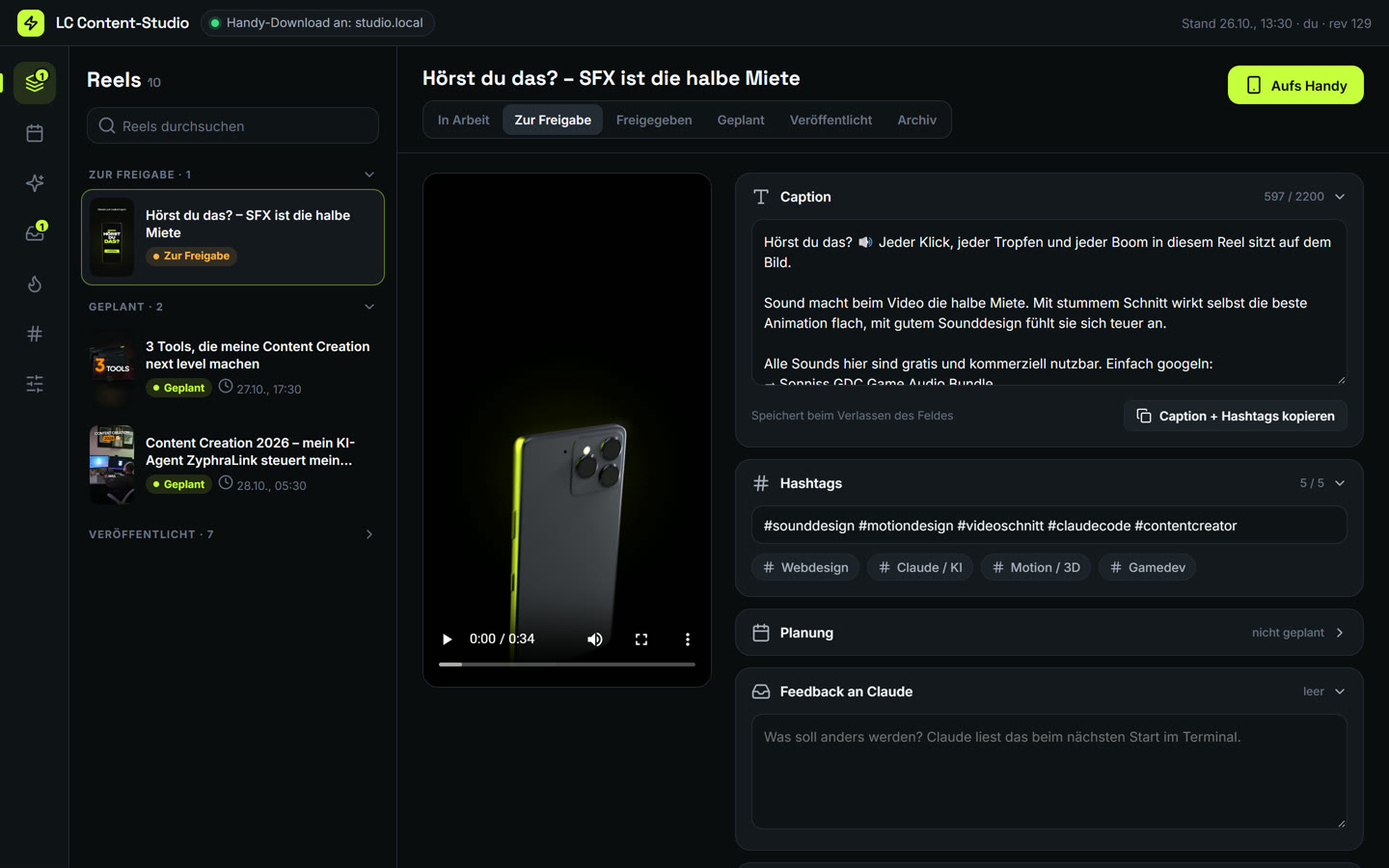
Reels-Ansicht des Studios (Beispieldaten)
Reels view of the studio (sample data)
Teil 2 · So funktioniert'sPart 2 · How it works
Der Bauplan: eine Datei, vier Bausteine.
The blueprint: one file, four building blocks.
data.json ist das Gedächtnis. Reels, Ideen, Termine, Nachrichten – du und Claude arbeiten in derselben Datei. Ein Zähler (rev) verhindert, dass ihr euch gegenseitig überschreibt.
Die Web-App läuft lokal auf deinem PC (Node.js). Darin gibst du frei, planst und schreibst Claude Feedback.
Die Instagram-API veröffentlicht Reels, liefert deine Insights und liest Kommentare.
Der Cronjob auf deinem Webspace postet zur geplanten Zeit und beantwortet Kommentare – unabhängig von deinem PC.
Das Handy holt sich Reel, Cover und Caption per QR-Code aus dem WLAN – nur lesend, nur wenn du es freischaltest.
data.json is the memory. Reels, ideas, dates, messages – you and Claude work in the same file. A counter (rev) keeps you from overwriting each other.
The web app runs locally on your PC (Node.js). That's where you approve, schedule and give Claude feedback.
The Instagram API publishes reels, delivers your insights and reads comments.
The cron job on your web space posts at the scheduled time and answers comments – independent of your PC.
Your phone pulls reel, cover and caption via QR code over Wi-Fi – read-only, only when you enable it.
Tutorial
Schritt für Schritt nachbauen.
Build it step by step.
Du schreibst keine Zeile Code selbst. Du gibst Claude Code die Prompts, prüfst das Ergebnis im Browser und richtest die Zugänge ein.
You don't write a single line of code yourself. You give Claude Code the prompts, check the result in the browser and set up the accounts.
01
Das brauchst du
What you need
Claude Code (Pro-Abo reicht)
Node.js 20 oder neuer
Instagram-Profi-Konto (Business oder Creator), verknüpft mit einer Facebook-Seite
Webspace mit PHP, Cronjob und SFTP-Zugang (z. B. Strato) – für Auto-Posting und Auto-DM
Claude Code (Pro plan is enough)
Node.js 20 or newer
Instagram professional account (business or creator) linked to a Facebook page
Free Meta developer app (Instagram Graph API)
Web space with PHP, cron job and SFTP access – for auto-posting and auto-DM
Leg einen leeren Projektordner an (z. B. insta-studio), öffne ihn im Terminal und starte dort claude.
Create an empty project folder (e.g. insta-studio), open it in the terminal and start claude there.
02
Der Bauplan-Prompt: Studio + data.json
The blueprint prompt: studio + data.json
Kopier den Prompt in Claude Code. Claude baut data.json, den Server und die Web-App. Danach startest du das Studio mit node server.mjs und öffnest http://localhost:8830.
Paste the prompt into Claude Code. Claude builds data.json, the server and the web app. Then start the studio with node server.mjs and open http://localhost:8830.
Baue mir ein lokales Content-Studio für Instagram (optional TikTok) als kleine Web-App. Ich arbeite mit dir (Claude Code) im selben Projektordner.

GRUNDPRINZIP: EINE DATEI ALS GEDÄCHTNIS
- Alles steht in data.json: account, ideas, videos, tasks, messages, hashtagSets, settings, log – plus rev (Zähler), updatedAt, updatedBy.
- Du (Claude) und ich (über die Web-App) lesen und schreiben dieselbe Datei. Bei jeder Änderung: rev + 1, updatedAt, updatedBy ("claude" oder "ich"), Eintrag vorne in log. Immer atomar schreiben (temporäre Datei + umbenennen).
- Die App speichert nur, wenn ihre rev noch aktuell ist – sonst lädt sie neu (kein Überschreiben deiner Änderungen).
- Status: Videos "in arbeit | zur freigabe | freigegeben | geplant | veröffentlicht | archiv", Ideen "vorschlag | freigegeben | in produktion | erledigt | abgelehnt", Aufträge "offen | in arbeit | erledigt".

SERVER (server.mjs, Node, ohne Framework)
- Liefert die App aus (app/index.html, app.js, app.css) auf http://localhost:8830.
- API: GET/PUT /api/data (PUT mit rev-Prüfung, 409 bei Konflikt), Upload von Videos und Covern nach media/.
- Schreiben nur von localhost. Im WLAN nur lesend: /m/<video-id> ist eine mobile Download-Seite (Video, Cover, Caption zum Kopieren) – und nur, wenn settings.lanShare an ist (Schalter in der App, Standard: aus).
- /api/qr?id=… erzeugt einen QR-Code (npm qrcode) mit der WLAN-Adresse des PCs, der auf diese Download-Seite zeigt.

APP (eine Seite, dunkles modernes Design, kompakt, aufklappbare Bereiche)
- Reels: Liste nach Status; Detail mit Video-Vorschau, Caption (Zähler bis 2200), Hashtags (max. 5, Sets per Klick), Planung (Datum + feste Zeitfenster 06:30 / 18:30, Plattformen), Feedback an Claude, Antwort-Vorlagen zum Kopieren, Knopf "Aufs Handy" (QR-Code).
- Freigabe per Klick: Nur "freigegeben" oder "geplant" darf je veröffentlicht werden.
- Kalender (Woche), geplante Reels als Karten, ungeplante in einer Seitenleiste.
- Ideen, Nachrichten (Chat mit dir + Aufträge), Trends & Referenzen (Links speichern, Analyse-Text), Bibliothek (Hashtag-Sets, Formate), Verbindungen (Status Instagram / Auto-Posting).

ARBEITSWEISE
- Lege eine CLAUDE.md an: Zu Beginn jeder Session liest du data.json (neue Nachrichten, offene Aufträge, Feedback an Videos) und sagst kurz, was ansteht. Antworten an mich schreibst du als messages-Eintrag.
- Keine Zugangsdaten im Code oder in data.json: Tokens und Passwörter nur in einer .env außerhalb des Projektordners.
- README.md: Start (node server.mjs), Ordner, Status-Werte.

Fang mit data.json (zwei Beispiel-Reels), server.mjs und der Reels-Ansicht an und zeig mir das Ergebnis im Browser. Danach Kalender, Ideen, Nachrichten, Bibliothek.
Build me a local content studio for Instagram (optionally TikTok) as a small web app. I work with you (Claude Code) in the same project folder.

CORE IDEA: ONE FILE AS SHARED MEMORY
- Everything lives in data.json: account, ideas, videos, tasks, messages, hashtagSets, settings, log – plus rev (counter), updatedAt, updatedBy.
- You (Claude) and I (through the web app) read and write the same file. On every change: rev + 1, updatedAt, updatedBy ("claude" or "me"), new entry at the top of log. Always write atomically (temp file + rename).
- The app only saves if its rev is still current – otherwise it reloads (never overwrites your changes).
- Status values: videos "draft | review | approved | scheduled | published | archived", ideas "proposal | approved | in production | done | rejected", tasks "open | in progress | done".

SERVER (server.mjs, Node, no framework)
- Serves the app (app/index.html, app.js, app.css) on http://localhost:8830.
- API: GET/PUT /api/data (PUT checks rev, 409 on conflict), upload of videos and covers to media/.
- Writes only from localhost. On the Wi-Fi read-only: /m/<video-id> is a mobile download page (video, cover, caption to copy) – and only if settings.lanShare is on (toggle in the app, default: off).
- /api/qr?id=… creates a QR code (npm qrcode) with the PC's Wi-Fi address pointing to that download page.

APP (single page, modern dark design, compact, collapsible sections)
- Reels: list by status; detail with video preview, caption (counter up to 2200), hashtags (max 5, sets in one click), scheduling (date + fixed slots 06:30 / 18:30, platforms), feedback for Claude, reply templates to copy, "To phone" button (QR code).
- Approval in one click: only "approved" or "scheduled" may ever be published.
- Calendar (week), scheduled reels as cards, unscheduled ones in a sidebar.
- Ideas, messages (chat with you + tasks), trends & references (save links, analysis text), library (hashtag sets, formats), connections (status Instagram / auto-posting).

WAY OF WORKING
- Create a CLAUDE.md: at the start of every session you read data.json (new messages, open tasks, feedback on videos) and briefly say what's next. You answer me as a messages entry.
- No credentials in code or data.json: tokens and passwords only in a .env outside the project folder.
- README.md: start (node server.mjs), folders, status values.

Start with data.json (two sample reels), server.mjs and the reels view and show me the result in the browser. Then calendar, ideas, messages, library.
Ab jetzt arbeitest du so: Ideen und Feedback schreibst du ins Studio, Claude liest sie beim nächsten Start, produziert und legt Reels „zur Freigabe“ ab.
From now on you work like this: you write ideas and feedback into the studio, Claude reads them on the next start, produces and puts reels “up for review”.
03
Instagram anbinden: Posten + Insights
Connect Instagram: posting + insights
Instagram-Konto in den Einstellungen auf Profi-Konto (Business oder Creator) umstellen und mit einer Facebook-Seite verknüpfen.
Auf developers.facebook.com eine App anlegen (Typ „Business“) und das Produkt Instagram (Graph API mit Facebook-Login) hinzufügen.
Im Graph-API-Explorer einen Token mit diesen Rechten erzeugen: instagram_basic, instagram_content_publish, instagram_manage_insights, instagram_manage_comments, instagram_manage_messages, pages_show_list, pages_read_engagement, business_management.
Den Token gegen einen langlebigen Token tauschen (Claude macht das für dich) und mit deiner Instagram-User-ID in die .env außerhalb des Projekts legen.
Switch your Instagram account to a professional account (business or creator) and link it to a Facebook page.
On developers.facebook.com create an app (type “Business”) and add the Instagram product (Graph API with Facebook login).
In the Graph API Explorer generate a token with these permissions: instagram_basic, instagram_content_publish, instagram_manage_insights, instagram_manage_comments, instagram_manage_messages, pages_show_list, pages_read_engagement, business_management.
Exchange it for a long-lived token (Claude does that for you) and put it with your Instagram user ID into the .env outside the project.
Binde Instagram an (Instagram Graph API, Login über Facebook):
1. tools/publish.mjs <video-id>: veröffentlicht ein Reel. Container anlegen (media_type=REELS, video_url, caption, cover_url), Status abfragen bis FINISHED, dann media_publish. Das Video muss öffentlich per URL erreichbar sein: lade es dafür kurz per SFTP in einen zufällig benannten Ordner auf meinem Webspace und lösche es danach wieder.
2. Bricht ab, wenn der Status nicht "freigegeben" oder "geplant" ist oder mehr als 5 Hashtags in der Caption stehen. Danach in data.json: Status "veröffentlicht", Link, Zeitpunkt.
3. tools/insights.mjs: holt für die letzten Reels views, reach, saved, shares und durchschnittliche Watchtime und schreibt analysis/own.json. Fass mir danach zusammen, was läuft und was nicht.
Token und IG-User-ID liest du aus meiner .env (nie ausgeben, nie committen).
Connect Instagram (Instagram Graph API, Facebook login):
1. tools/publish.mjs <video-id>: publishes a reel. Create a container (media_type=REELS, video_url, caption, cover_url), poll until FINISHED, then media_publish. The video must be publicly reachable by URL: upload it briefly via SFTP to a randomly named folder on my web space and delete it afterwards.
2. Abort if the status is not "approved" or "scheduled" or the caption has more than 5 hashtags. Afterwards in data.json: status "published", link, time.
3. tools/insights.mjs: fetches views, reach, saved, shares and average watch time for the latest reels and writes analysis/own.json. Then summarize for me what works and what doesn't.
Read token and IG user ID from my .env (never print, never commit).
Langlebige Tokens laufen nach rund 60 Tagen ab. Lass Claude das Ablaufdatum in data.json notieren und dich rechtzeitig erinnern.
Long-lived tokens expire after about 60 days. Let Claude note the expiry date in data.json and remind you in time.
04
Auto-Posting über deinen Webspace
Auto-posting via your web space
Damit auch bei ausgeschaltetem PC gepostet wird, übernimmt ein kleines PHP-Skript auf deinem Webspace. Du brauchst nur SFTP-Zugang und die Möglichkeit, einen Cronjob anzulegen (im Kundenmenü deines Hosters).
To post while your PC is off, a small PHP script on your web space takes over. You only need SFTP access and the option to create a cron job (in your host's customer panel).
Baue Auto-Posting, das auch bei ausgeschaltetem PC läuft:
1. Auf meinem Webspace (PHP) liegt _autopost/run.php mit einem langen geheimen Schlüssel (?key=…) und einer gesperrten Warteschlange _autopost/data/ (.htaccess: Require all denied).
2. tools/autopost.mjs sync lädt alle Reels mit Status "geplant" (Video, Cover, Caption, Zeitpunkt) per SFTP in die Warteschlange und entfernt abgesagte.
3. Ein Cronjob beim Hoster ruft run.php alle 5 Minuten auf. run.php veröffentlicht fällige Reels über die Graph API (Container → FINISHED → media_publish), löscht danach das Video und schreibt Ergebnis + Link zurück.
4. Das Studio gleicht beim Start und alle 10 Minuten ab und setzt den Status auf "veröffentlicht".
5. tools/autopost.mjs setup --apply erzeugt den Schlüssel (nur in meiner .env) und lädt run.php hoch; status/health zeigen, ob der Cron läuft.
Build auto-posting that also works while my PC is off:
1. On my web space (PHP) there is _autopost/run.php with a long secret key (?key=…) and a locked queue _autopost/data/ (.htaccess: Require all denied).
2. tools/autopost.mjs sync uploads all reels with status "scheduled" (video, cover, caption, time) via SFTP to the queue and removes cancelled ones.
3. A cron job at the host calls run.php every 5 minutes. run.php publishes due reels via the Graph API (container → FINISHED → media_publish), deletes the video afterwards and writes back result + link.
4. The studio syncs on start and every 10 minutes and sets the status to "published".
5. tools/autopost.mjs setup --apply creates the key (only in my .env) and uploads run.php; status/health show whether the cron is running.
Danach im Hoster-Menü einen Cronjob anlegen, der alle 5 Minuten die geheime Adresse von run.php aufruft. Ab jetzt: Reel freigeben, Termin wählen, fertig.
Then create a cron job in your host's panel that calls the secret run.php URL every 5 minutes. From now on: approve, pick a date, done.
05
Aufs Handy per QR-Code
To your phone via QR code
Ist schon im Bauplan-Prompt drin: Schalte in der App die Handy-Freigabe ein, klick bei einem Reel auf „Aufs Handy“ und scann den QR-Code. Das Handy muss im selben WLAN sein. Die Download-Seite kann nur lesen – Ändern geht ausschließlich am PC.
Already part of the blueprint prompt: enable phone sharing in the app, click “To phone” on a reel and scan the QR code. Your phone must be on the same Wi-Fi. The download page is read-only – changes are only possible on the PC.
In fremden Netzen (Büro, Café) die Handy-Freigabe ausgeschaltet lassen.
Keep phone sharing switched off on other networks (office, café).
06
Auto-Antworten: Kommentar-Wort → DM
Auto-replies: comment keyword → DM
So funktioniert auch „Kommentiere STUDIO“: Der Cronjob liest neue Kommentare und schickt den Link per DM. Dafür muss in der Instagram-App unter Einstellungen → Nachrichten der Zugriff für verbundene Tools erlaubt sein.
This is how “Comment STUDIO” works: the cron job reads new comments and sends the link by DM. In the Instagram app, allow access to messages for connected tools (settings → messages).
Baue Auto-Antworten auf Kommentare (läuft im selben Cronjob wie das Auto-Posting):
1. In data.json gibt es keywords: [{ wort: "STUDIO", dm: "Hier ist dein Bauplan 👇 <Link>", antwort: "Ist raus – schau in deine DMs!" }].
2. run.php holt bei jedem Lauf neue Kommentare unter meinen letzten Reels (/{media-id}/comments). Enthält ein Kommentar ein Stichwort, schickst du genau einmal eine private Antwort (Private Reply an die comment_id über die Messaging-API) und eine öffentliche Antwort unter den Kommentar.
3. Beantwortete Kommentar-IDs merkst du dir, damit niemand doppelt angeschrieben wird. Private Replies gehen nur innerhalb von 7 Tagen nach dem Kommentar.
4. Im Studio zeigt eine Liste, wer was bekommen hat.
Build auto-replies to comments (runs in the same cron job as auto-posting):
1. data.json gets keywords: [{ word: "STUDIO", dm: "Here's your blueprint 👇 <link>", reply: "Sent – check your DMs!" }].
2. On every run, run.php fetches new comments under my latest reels (/{media-id}/comments). If a comment contains a keyword, send exactly one private reply (Private Reply to the comment_id via the Messaging API) and a public reply under the comment.
3. Remember answered comment IDs so nobody gets messaged twice. Private replies only work within 7 days after the comment.
4. In the studio a list shows who received what.
07
Sicher bleiben
Stay safe
Tokens, Passwörter und den Cron-Schlüssel nur in der .env – nie in data.json, nie in Git, nie auf der Webseite.
Die Warteschlange auf dem Webspace ist gesperrt; Videos werden nach dem Posten sofort gelöscht.
Veröffentlicht wird nur, was du freigegeben hast – das prüft jedes Skript selbst.
Tokens, passwords and the cron key only in the .env – never in data.json, never in Git, never on the website.
The queue on the web space is locked; videos are deleted right after posting.
Only what you approved gets published – every script checks that itself.
Lieber fertig eingerichtet?
Rather have it set up for you?
Wir bauen dir dein Content-Studio – angebunden an deine Kanäle und Abläufe.
We build your content studio – connected to your channels and workflows.
Verantwortlich für den Inhalt nach §55 Abs. 2 RStV
Georg Laqua Alt Burgholzhausen 40 61381 Friedrichsdorf
Haftung für Inhalte
Als Diensteanbieter sind wir gemäß §7 Abs.1 TMG für eigene Inhalte auf diesen Seiten nach den allgemeinen Gesetzen verantwortlich. Nach §§8 bis 10 TMG sind wir als Diensteanbieter jedoch nicht verpflichtet, übermittelte oder gespeicherte fremde Informationen zu überwachen.
Haftung für Links
Unser Angebot enthält Links zu externen Websites Dritter, auf deren Inhalte wir keinen Einfluss haben. Fuer die Inhalte der verlinkten Seiten ist stets der jeweilige Anbieter verantwortlich.
Urheberrecht
Die durch die Seitenbetreiber erstellten Inhalte und Werke unterliegen dem deutschen Urheberrecht.
EU-Streitbeilegung
Die Europäische Kommission stellt eine Plattform zur Online-Streitbeilegung (OS) bereit: ec.europa.eu/consumers/odr/. Wir sind nicht verpflichtet und nicht bereit, an Streitbeilegungsverfahren vor einer Verbraucherschlichtungsstelle teilzunehmen.
Stand: Juli 2026
Datenschutzerklärung
1. Verantwortlicher
Georg Laqua, Alt Burgholzhausen 40, 61381 Friedrichsdorf E-Mail: info@luminaracraft.de
2. Datenerhebung
Beim Besuch dieser Website werden durch den Hosting-Provider automatisch technische Daten erhoben (IP-Adresse, Browsertyp, Zugriffszeit). Diese Daten sind für den technischen Betrieb erforderlich.
3. Kontaktformular
Ihre Angaben (Name, E-Mail, Nachricht) werden zur Bearbeitung der Anfrage über den Dienst Web3Forms verarbeitet. Rechtsgrundlage: Art. 6 Abs. 1 lit. b DSGVO.
4. Google Ads Conversion-Tracking
Diese Website nutzt bei Einwilligung Google Ads Conversion-Tracking (Google Ireland Limited). Google setzt dafür Cookies ein. Rechtsgrundlage: Art. 6 Abs. 1 lit. a DSGVO (Einwilligung). Sie können die Einwilligung jederzeit widerrufen. Mehr: Google Datenschutzerklärung.
5. Cookies
Diese Website verwendet nur technisch notwendige Cookies sowie bei Einwilligung Cookies von Google Ads.
6. Externe Dienste
Google Fonts: Schriftarten von Google Servern (Google Ireland Limited)
Web3Forms: Kontaktformular-Dienst
Google Ads: Werbe-Tracking (nur mit Einwilligung)
WhatsApp: Beim Klick auf den WhatsApp-Button werden Sie zu WhatsApp (Meta Platforms Ireland Ltd.) weitergeleitet. Dabei können Daten an Meta übertragen werden. Mehr: WhatsApp Datenschutzrichtlinie
Sie haben das Recht, sich bei einer Datenschutz-Aufsichtsbehörde zu beschweren. Zuständig ist der Hessische Beauftragte für Datenschutz und Informationsfreiheit, Postfach 3163, 65021 Wiesbaden.
Stand: Juli 2026
AGB
1. Geltungsbereich
Diese AGB gelten für alle Verträge zwischen GL E-Commerce via luminaracraft.de (Georg Laqua, Alt Burgholzhausen 40, 61381 Friedrichsdorf) und dem Auftraggeber über Websites, Webapplikationen, Apps, Software und damit verbundene Dienstleistungen.
2. Vertragsschluss
Ein Vertrag kommt erst durch schriftliche Auftragsbestätigung (auch per E-Mail) zustande. Anfragen sind unverbindlich.
3. Leistungsumfang
Alle Leistungen werden individuell nach den Wünschen und Anforderungen des Auftraggebers erstellt. Es handelt sich nicht um vorgefertigte Lösungen, Templates oder Standardprodukte, sondern um maßgeschneiderte Entwicklung. Der genaue Umfang ergibt sich aus der individuellen Vereinbarung.
4. Preise und Zahlung
Alle Preise sind Endpreise gemäß Kleinunternehmerregelung (§19 UStG). Zahlung per Banküberweisung innerhalb von 14 Tagen nach Rechnungsstellung.
5. Mitwirkungspflichten
Der Auftraggeber stellt erforderliche Inhalte rechtzeitig bereit und stellt sicher, dass keine Rechte Dritter verletzt werden.
6. Urheberrecht
Nach vollständiger Bezahlung gehen alle Nutzungsrechte auf den Auftraggeber über.
7. Haftung
Haftung nur für vorsätzliches und grob fahrlässiges Verhalten, begrenzt auf vorhersehbare typische Schäden.
8. Widerrufsrecht
Verbraucher haben ein 14-tägiges Widerrufsrecht. Widerruf schriftlich an info@luminaracraft.de.