Diesen Hero mit KI selbst bauen.
Build this hero yourself with AI.
Zwei Bilder, ein Prompt, etwas Feinschliff. Du brauchst keine Programmierkenntnisse – nur eine Bild-KI, eine Coding-KI und etwa eine Stunde.
Two images, one prompt, a bit of polish. No coding skills needed – just an image AI, a coding AI and about an hour.
Was du brauchst
What you need
- Bild-KI mit Bearbeitungsfunktion, z. B. ChatGPT, Gemini, Midjourney oder Leonardo.
- Coding-KI, z. B. Claude, ChatGPT oder Gemini – je stärker das Modell, desto näher am Original.
- Optional einen Upscaler für scharfe Bilder ab ca. 2000 px Breite.
- Einen Ordner auf deinem Rechner und einen Browser.
- An image AI that can edit images, e.g. ChatGPT, Gemini, Midjourney or Leonardo.
- A coding AI, e.g. Claude, ChatGPT or Gemini – the stronger the model, the closer to the original.
- Optionally an upscaler for crisp images of about 2000 px width.
- A folder on your computer and a browser.
Bild A erzeugen – die Oberfläche
Create image A – the surface
Das ist das Bild, das man zuerst sieht. Wähle 16:9 und eine Figur, die mittig steht – der Effekt wirkt am stärksten, wenn das Gesicht in beiden Bildern gleich bleibt und sich alles drumherum ändert. Prompts funktionieren auf Englisch meist besser.
This is the image people see first. Use 16:9 and a centred character – the effect works best when the face stays the same in both images while everything around it changes.
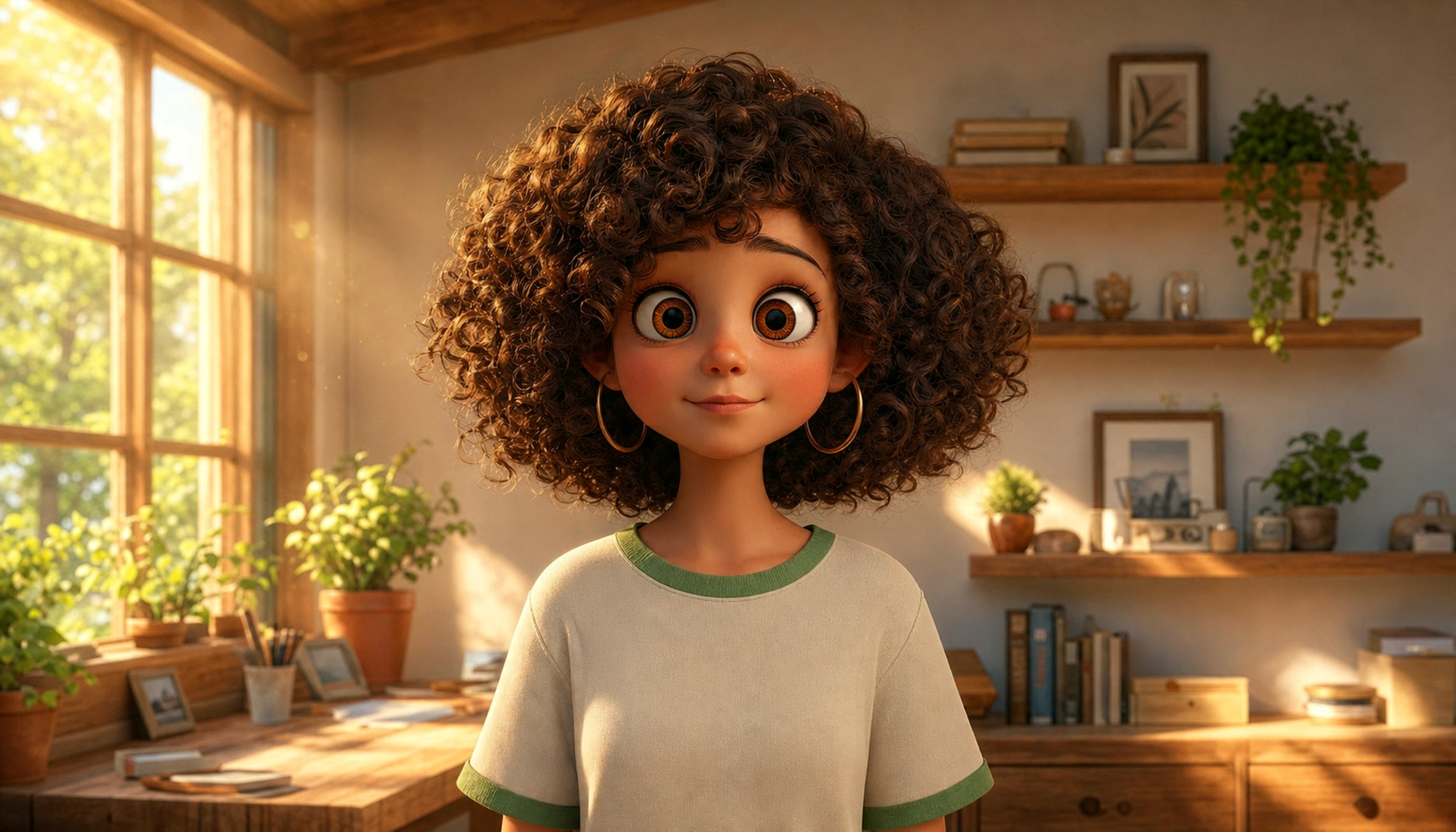
stylized 3D character render, Pixar / Disney animation style, semi-realistic, young woman with big curly dark hair, big expressive brown eyes, gold hoop earrings, cream t-shirt with green trim, standing centered in a cozy sunlit room with wooden shelves, plants and a large window, warm golden hour light, soft depth of field, front view, waist-up, 16:9
Bild B erzeugen – die Welt darunter
Create image B – the world underneath
Wichtig: Bild B nicht neu generieren, sondern Bild A bearbeiten lassen (Bild hochladen + Prompt). Nur so bleiben Gesicht, Pose und Bildausschnitt gleich. Je größer der Kontrast – warm/kalt, Tag/Nacht, Alltag/Fantasie –, desto stärker der Effekt.
Important: don't generate image B from scratch – let the AI edit image A (upload it + prompt). That's the only way face, pose and framing stay the same. The bigger the contrast – warm/cold, day/night, everyday/fantasy – the stronger the effect.
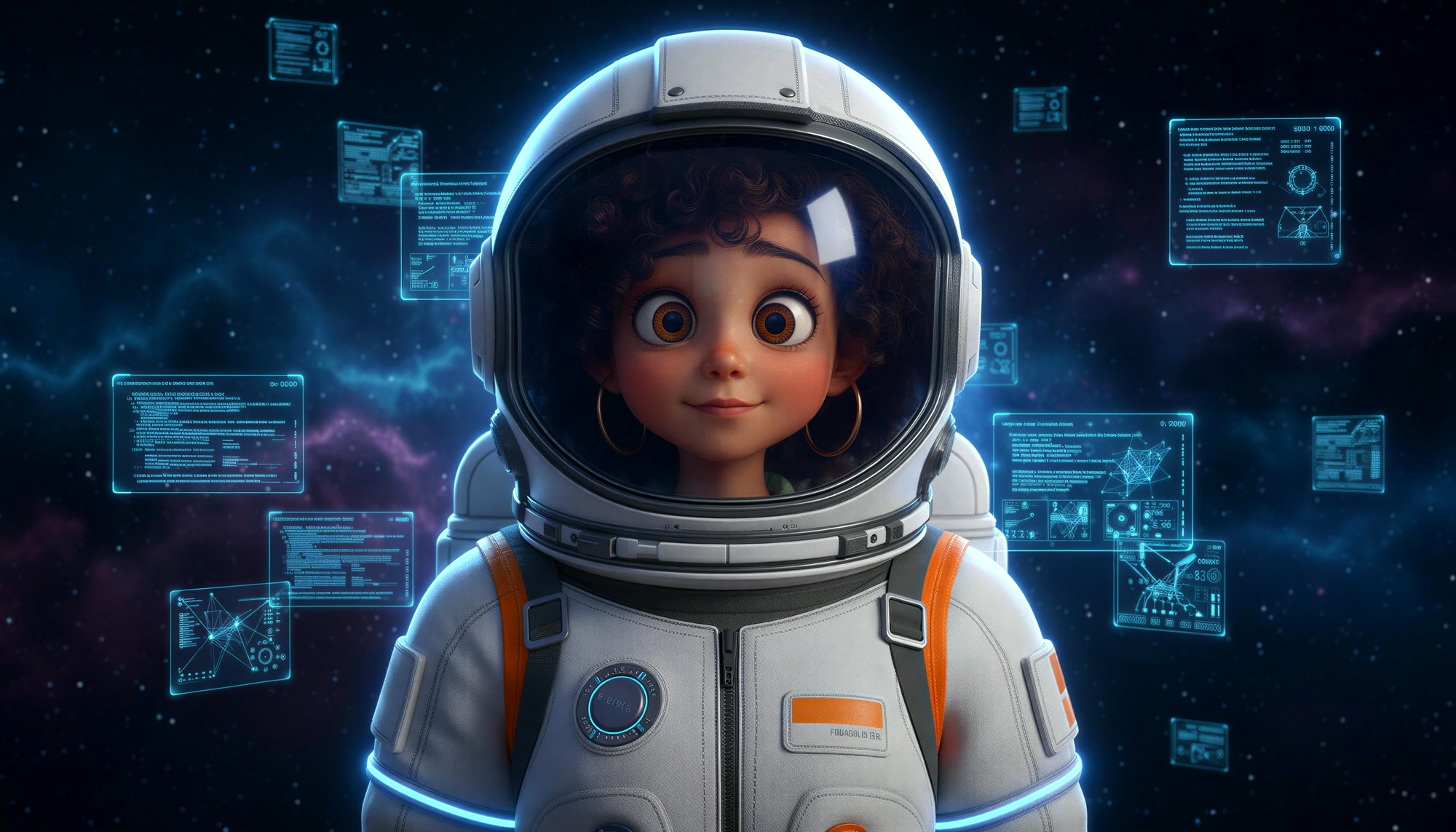
Edit this image: keep the character's face, pose, size and position exactly identical. Change her outfit into a white astronaut suit with a glass helmet and orange details, and replace the room with deep space: stars, a blue-purple nebula and floating holographic cyan code panels. Cool blue lighting. Same framing, same camera, 16:9.
Bilder deckungsgleich machen
Line the images up
Meist verschiebt die KI das Motiv ein paar Pixel. Das fällt beim Freibrennen sofort auf, deshalb kurz angleichen – kostenlos im Browser mit Photopea:
The AI usually shifts the subject by a few pixels. That shows immediately when revealing, so line them up – for free in the browser with Photopea:
- Bild A öffnen, Bild B als neue Ebene darüberziehen.
- Ebene B auf 50 % Deckkraft stellen.
- B mit Strg+T skalieren und verschieben, bis die Augen genau übereinanderliegen.
- Deckkraft zurück auf 100 %, Ebene A ausblenden und als
b.jpgin der Größe von A exportieren. - Beide Bilder gleich groß speichern:
img/a.jpgundimg/b.jpg.
- Open image A, drag image B on top as a new layer.
- Set layer B to 50 % opacity.
- Scale and move B with Ctrl+T until the eyes sit exactly on top of each other.
- Opacity back to 100 %, hide layer A and export as
b.jpgat the size of A. - Save both at the same size:
img/a.jpgandimg/b.jpg.
Tipp: B lieber etwas vergrößern als verkleinern – sonst entstehen leere Ränder.
Tip: rather enlarge B a little than shrink it – otherwise you get empty edges.
Den Hero von der KI bauen lassen
Let the AI build the hero
Diesen Prompt komplett in einen neuen Chat deiner Coding-KI kopieren. Texte, Farben und Schrift kannst du vorher direkt im Prompt anpassen.
Copy this prompt into a new chat with your coding AI. You can change texts, colours and font right in the prompt.
Baue einen Vollbild-Website-Hero als eine einzelne index.html (HTML, CSS, JavaScript, keine Libraries, kein Build).

BILDER
- img/a.jpg (Oberfläche) und img/b.jpg (darunter), gleich groß und deckungsgleich.
- Beide füllen den Hero wie object-fit: cover, vertikal bei 35 % ausgerichtet.

EFFEKT
Wo die Maus entlangfährt, brennt sich Bild A weg und Bild B wird sichtbar – mit tintigem, rauchigem Rand und einer feinen Glutlinie. Die Spur schließt sich nach ca. 2,5 s wieder.

TECHNIK
1. Spur: ein 2D-Canvas in 1/4 Auflösung. Entlang des Mauswegs (von letzter zu aktueller Position, Abstand ca. 25 % des Radius) weiche radiale Kleckse einzeichnen (schwarz, Alpha innen 0.8 → außen 0). Radius ca. 15 % der kürzeren Bildschirmseite, bei schneller Bewegung etwas größer. Die Mausposition weich nachziehen (Lerp 0.35).
2. Abklingen: Spur mit destination-out ausblenden, Halbwertszeit 1,5 s, framerate-unabhängig. WICHTIG: die Abklingzeit sammeln und erst abziehen, wenn mindestens 3 % fällig sind – sonst rundet der 8-Bit-Canvas bei 60 fps auf 0 und die Spur bleibt für immer stehen.
3. WebGL-Fullscreen-Shader (WebGL 1, Spur jedes Frame als Textur hochladen, Alpha-Kanal nutzen):
   - spur = clamp((alpha - 0.16) / 0.84, 0, 1)  (Restwerte abschneiden)
   - Domain-warped fbm-Noise (5 Oktaven), das langsam nach oben zieht; die Spur damit leicht verzerrt abtasten.
   - v = spur * 1.25 + (noise - 0.5) * 1.1; Loch = smoothstep(0.5, 0.52, v) → dort Bild B.
   - Außerhalb des Lochs: tintiger, fast schwarzer Saum (smoothstep 0.12–0.49) mit Rauchschlieren; eine feine Glutlinie direkt an der Kante (dunkelrot → #FF4F1F → gelbweiß), nur dezent.
   - Rauch: zweite Noise-Schicht, die Spur nach oben versetzt abtasten und halbtransparent grau (#292626, ca. 55 %) überblenden, damit Rauch über den Löchern aufsteigt.
   - Pixel ohne Spur sofort mit Bild A ausgeben (Performance).
4. Vereinzelte Glutfunken als kleine Striche auf einem 2D-Canvas darüber (additiv), die aufsteigen und verglimmen.
5. Eigener Cursor: kleiner glühender Punkt. Bewegt niemand die Maus (beim Laden, nach 4 s Ruhe, auf Touch-Geräten), fährt ein automatischer Cursor in einer Lissajous-Kurve über das Bild.
6. devicePixelRatio max. 1.5. Animation anhalten, wenn der Hero nicht im Bild ist (IntersectionObserver). Ohne WebGL: Bild A als CSS-Hintergrund.

LAYOUT
- Höhe 100svh, dunkler Verlauf von unten für Lesbarkeit.
- Nav oben: Logo links, Button rechts („Projekt starten“).
- Unten links eine große, fette Headline (Plus Jakarta Sans 800, zwei Zeilen): „Schön an der Oberfläche. / Stark im Code.“ – das Wort „Code“ mit animiertem Orange-Gold-Verlauf, Punkte in Orange.
- Darunter eine Trennlinie, links eine Unterzeile, rechts zwei Buttons (Orange #FF4F1F und Outline).
- Mobil: Headline umbrechen, Buttons untereinander.
Build a full-screen website hero as a single index.html (HTML, CSS, JavaScript, no libraries, no build step).

IMAGES
- img/a.jpg (surface) and img/b.jpg (underneath), same size and perfectly aligned.
- Both fill the hero like object-fit: cover, vertically anchored at 35 %.

EFFECT
Wherever the mouse moves, image A burns away and image B shows through – with an inky, smoky edge and a thin ember line. The trail closes again after about 2.5 s.

TECHNIQUE
1. Trail: a 2D canvas at 1/4 resolution. Along the mouse path (from last to current position, spacing about 25 % of the radius) paint soft radial dabs (black, alpha 0.8 in the centre → 0 at the edge). Radius about 15 % of the shorter screen side, a bit larger when moving fast. Smooth the mouse position (lerp 0.35).
2. Decay: fade the trail with destination-out, half-life 1.5 s, frame-rate independent. IMPORTANT: accumulate the decay time and only subtract once at least 3 % is due – otherwise the 8-bit canvas rounds the step to 0 at 60 fps and the trail never disappears.
3. WebGL full-screen shader (WebGL 1, upload the trail as a texture every frame, use the alpha channel):
   - trail = clamp((alpha - 0.16) / 0.84, 0, 1)  (cut off leftovers)
   - Domain-warped fbm noise (5 octaves) that slowly drifts upwards; sample the trail slightly distorted by it.
   - v = trail * 1.25 + (noise - 0.5) * 1.1; hole = smoothstep(0.5, 0.52, v) → show image B there.
   - Outside the hole: an inky, almost black rim (smoothstep 0.12–0.49) with smoky wisps; a thin ember line right at the edge (dark red → #FF4F1F → yellow-white), subtle.
   - Smoke: a second noise layer, sample the trail shifted upwards and blend in semi-transparent grey (#292626, about 55 %) so smoke rises above the holes.
   - Pixels without trail return image A right away (performance).
4. A few ember sparks as small strokes on a 2D canvas on top (additive), rising and fading out.
5. Custom cursor: a small glowing dot. When nobody moves the mouse (on load, after 4 s idle, on touch devices) an automatic cursor moves across the image along a Lissajous curve.
6. devicePixelRatio max 1.5. Pause the animation when the hero is off-screen (IntersectionObserver). Without WebGL: image A as CSS background.

LAYOUT
- Height 100svh, dark gradient from the bottom for legibility.
- Nav at the top: logo left, button right ("Start a project").
- Bottom left a big, bold headline (Plus Jakarta Sans 800, two lines): "Beautiful on the surface. / Strong in code." – the word "code" with an animated orange-gold gradient, full stops in orange.
- Below a divider, a subline on the left, two buttons on the right (orange #FF4F1F and outline).
- Mobile: wrap the headline, stack the buttons.Testen & feinjustieren
Test & fine-tune
- Code als
index.htmlneben den Ordnerimgspeichern. - Nicht per Doppelklick öffnen – WebGL darf lokale Bilder dann nicht laden. Stattdessen im Ordner
python -m http.serverodernpx servestarten undhttp://localhost:8000bzw.:3000öffnen. - Läuft etwas nicht: Konsole öffnen (F12), Fehlermeldung kopieren und der KI schicken: „Behebe diesen Fehler: …“
- Dann in kleinen Schritten verfeinern, zum Beispiel:
- Save the code as
index.htmlnext to theimgfolder. - Don't open it by double-click – WebGL isn't allowed to load local images then. Run
python -m http.serverornpx servein the folder and openhttp://localhost:8000or:3000. - Something broken? Open the console (F12), copy the error and send it to the AI: "Fix this error: …"
- Then refine in small steps, for example:
Online stellen
Go live
Ordner mit index.html und img/ auf deinen Webspace laden – fertig. Keine Datenbank, kein Build. Bilder vorher als JPG mit ca. 80 % Qualität speichern, dann lädt der Hero auch mobil schnell.
Upload the folder with index.html and img/ to your web space – done. No database, no build. Save the images as JPG at about 80 % quality so the hero loads fast on mobile too.
Keine Zeit zum Basteln?
No time to tinker?
Ich baue dir so einen Hero – mit deinen Motiven, deiner Marke und allem, was danach kommt.
I'll build a hero like this for you – with your visuals, your brand and everything that comes after.